How to design a survey question
Last updated: April 14, 2026
Creating survey questions that provide meaningful, unbiased answers is not easy. Use this guide when creating your own survey questions.
You can create custom questions to use in your Teamspective Engagement surveys. This article tells you how to design them well.
Before creating custom questions, we recommend using Teamspective's standard questions if possible. Those come with several benefits: science-backed themes, question and answer scales optimized with thousands of responses, and benchmarks from other companies.
The golden rules for good survey questions
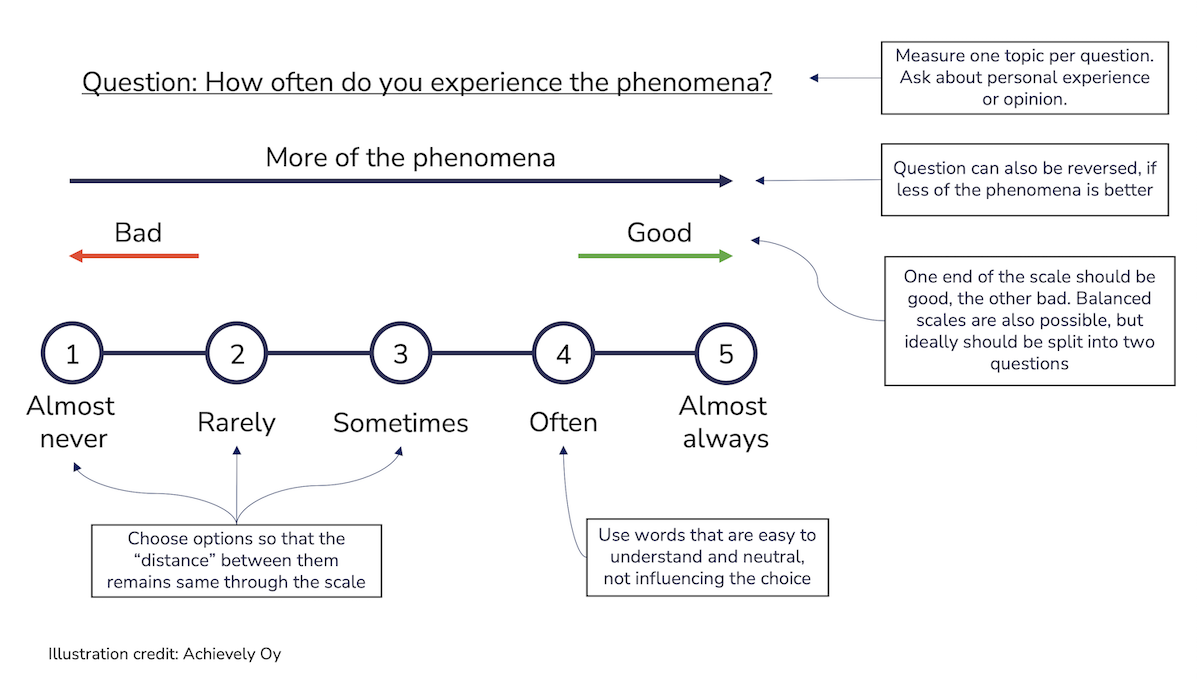
Measure only one topic per question
Ask about the responder's own, observable experience
Use a frequency-based response scale where possible
Use a numerical scale with words only at the extremes
Include a "not applicable" option
1. Measure only one topic per question
Focusing on one topic increases response quality by helping everyone interpret the question the same way. It also makes results more actionable — you won't need to guess which part of the question drove the score.
✅ Good: Is it clear what you should focus on and prioritize?
❌ Bad: Is it clear what you should focus on and what others expect from you?
❌ Bad: Is it clear what your manager, colleagues and customers expect from you?
2. Ask about the responder's own, observable experience
Ask about concrete behaviors and situations the respondent has directly witnessed or experienced — not about inner motives, general impressions, or what they think others feel. This minimizes bias from assumptions and stereotypes.
✅ Good: How often does your manager give you clear feedback on your work?
✅ Good: How often do you find it hard to fit in at work?
❌ Bad: Is it easy to become included in our team? (asks for a general assessment, not personal experience)
❌ Bad: Are your colleagues struggling to fit in at work? (asks the respondent to evaluate others' internal experience)
3. Use a frequency-based response scale where possible
Frequency scales ("never → always") consistently produce more accurate and unbiased data than agreement scales ("disagree → agree"). Agreement questions are prone to bias — for example, almost nobody will say they are not dedicated to quality. Frequency questions anchor responses in actual observed behavior.
Preferred: Almost never / Rarely / Sometimes / Usually / Almost always
Use with caution: Strongly disagree / Disagree / Neutral / Agree / Strongly agree
Note: sometimes a "balanced" scale is justified — e.g. Too little … Just right … Too much. But this is the exception, not the rule.
4. Use a numerical scale with words only at the extremes
All-word scales create problems: the "distance" between labels differs for different people, and results become hard to compare statistically across teams, time periods, or geographies. A numerical scale (e.g. 1–7) with anchor words at each end produces more reliable, comparable data.
Teamspective's default response scales are designed with this in mind — use them when possible.
✅ Good: 1 (Almost never) — 2 — 3 — 4 — 5 (Almost always)
❌ Bad: Unacceptable / Does not meet expectations / Meets expectations / Exceeds expectations / Far exceeds expectations (unequal distances, overlapping meanings)
❌ Bad: Always / Frequently / Quite frequently / Rarely / Never (some options too similar, uneven spacing)
5. Include a "not applicable" option
Without a "not applicable" or "don't know" option, respondents who genuinely cannot answer a question are forced to either skip it or provide a meaningless answer. Including this option increases response rates and data quality — make it visually distinct from the main scale so it's clearly optional.