How often are automatic engagement survey reminders sent out?
Last updated: July 1, 2026
Teamspective sends reminders automatically to participants who have not yet responded. The number and timing of reminders depends on how long the survey response window is.
Reminder schedule
Reminders are scheduled backward from the survey closing time:
1. 1 hour before closing — a final reminder sent 1 hour before the survey closes. Only scheduled if the survey is longer than 4 hours.
2. 1 day before closing — a reminder sent 1 day before the survey closes.
3. Every 2 days before that — additional reminders are scheduled every other day, working backward from the 1-day-before reminder toward the survey start.
The 1-day-before reminder and the every-2-day reminders together are capped at a maximum of 5 reminders. Combined with the final 1-hour reminder, a survey can trigger up to 6 reminder notifications in total.
The every-2-day reminders only apply when the survey response window is at least 2 days long. For shorter surveys, only the final 1-hour reminder is sent.
Example: 2-week survey
For a survey closing on a Friday at 10:00:
Reminder | Scheduled time | |
#1 (earliest) | ~9 days before closing | |
#2 | ~7 days before closing | |
#3 | ~5 days before closing | |
#4 | ~3 days before closing | |
#5 | 1 day before closing | |
Final | 1 hour before closing |
Exact times may shift due to weekend adjustments (see below).
Weekend and business hours
Reminders (except the final 1-hour reminder) are adjusted to fall on workdays. If a reminder would land on a weekend, it is moved backward to the nearest preceding workday at the same time of day. This can have a cascading effect: because each earlier reminder is calculated relative to the previous one, shifting one reminder backward may also shift earlier reminders.
The final 1-hour reminder is never moved — it is always sent exactly 1 hour before the survey closes, even if that falls on a weekend or outside business hours.
Who receives reminders?
Reminders are only sent to participants who have unanswered questions. Participants who have already completed the survey will not receive any further reminders. If a participant has answered some but not all questions, they will continue to receive reminders until all questions are answered or the survey closes.
Delivery channels
Reminders are delivered based on each participant's notification settings and connected platforms:
- Slack — if the participant has Slack connected, the survey is resent as an interactive message in Slack
- Microsoft Teams — if connected and enabled in notification preferences
- Email — used as the default channel
Participants can manage their reminder preferences from their notification settings.
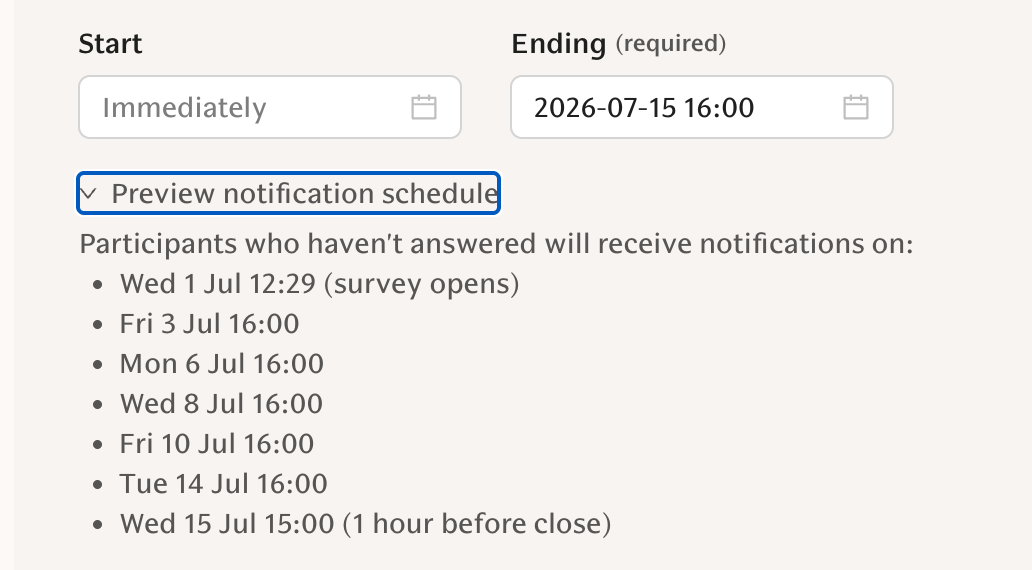
Preview and track reminder schedule
You can preview and track the reminder schedule in the Survey editor page under the settings: