How are KPI and Theme scores calculated in Engagement?
Last updated: November 10, 2025
This article helps you understand in technical detail how KPI and Theme scores are calculated in Teamspective.
You can find our article on calculating question scores here:
📄 How are Engagement survey question scores calculated?
For a simpler and actionable guide to reading survey results, please view this article:
The Basics
Theme scores combine results from question scores and allow measuring higher level phenomena within employee engagement.
KPI scores combine results from Theme scores to allow measuring an overall level of engagement or work wellbeing.
KPI and Theme scores range between 0 and 100.
Teamspective's data model includes a predefined set of Themes and KPIs based on our research. For example, our analysis has shown that Wellbeing can be sub-categorized into Mental wellbeing, and Physical health and safety.
This data model allows you to immediately start measuring engagement with a reliable set of metrics. Additionally, you can create custom Themes and KPIs to support any organization specific analytics.
Calculation Method - Single survey
When you are viewing Theme or KPI scores within a single survey, we calculate the scores with this method:
Theme Scores:
Find all questions that belong to the theme
For each person, take their survey answer to each of these questions
Average the scores of all questions in the theme
Technically we use a weighted average based on response counts per question. This ensures that questions that have significantly less responses don't have a disproportionate effect on the theme score.
This gives you the theme score
KPI Scores:
Find all themes that belong to the KPI
Calculate each theme's score (as described above)
Average the scores of all themes in the KPI
This gives you the KPI score
Calculation Method - Multiple surveys
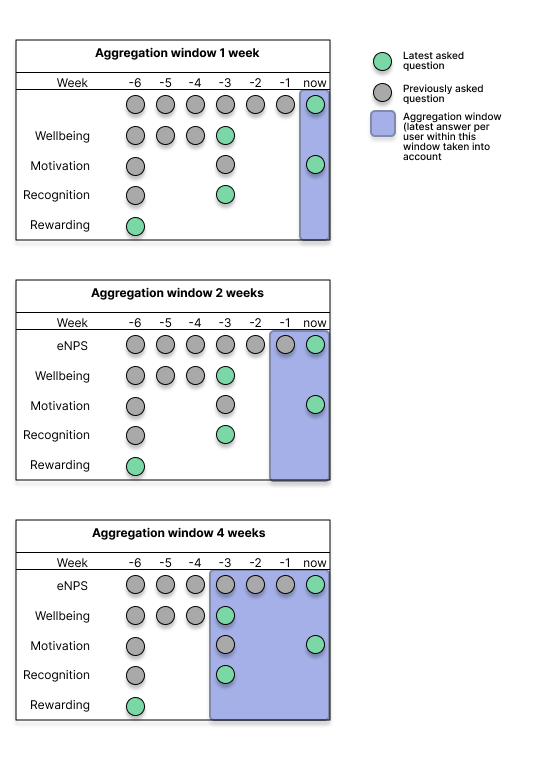
When you are viewing results across multiple surveys (ie. have selected a survey program), we calculate the KPI and Theme level results by default over a 26-week aggregation window.
Aggregation window for KPIs and Themes
KPI and Theme scores are calculated from each user’s most recent answer to a question within the aggregation window starting from the latest survey.
How it works
Our system:
Finds the most recent survey publication date within the survey program
Looks back 26 weeks (default) from that date
Includes all surveys that ended within that 26-week period within the survey program
For each question in each Theme, uses each person's most recent answer to calculate the Theme score.
Calculates the KPIs based on the Theme scores.
When to use different window sizes
Longer Window (26 weeks - Recommended):
Best for recurring surveys (weekly, bi-weekly, monthly)
Best when running many targeted surveys to different groups
Provides stable trends over time
Smooths out variation due to unresponsiveness
Shorter Window (2-12 weeks):
Best for annual or quarterly surveys
Best when surveys target the entire workspace at once
Provides more immediate feedback
Best when higher sensitivity to recent changes is needed
How to adjust the window
You can adjust the aggregation window for KPI and Theme scores:
workspace level: at Engagement -> Settings -> Aggregation window for KPIs and Themes
survey program level: Engagement -> Customize surveys -> Survey programs -> Edit / Create survey program -> Aggregation window for KPIs and Themes
NOTE: aggregation windows will include answers from former employees if they responded to the question within the set timeframe. Please take this into account when adjusting the duration for the window.
Example Scenario:
Timeline over 26 weeks:
- Week 1: Survey to Marketing team
- Week 8: Survey to Engineering team
- Week 15: Survey to Sales team
- Week 20: Survey to All teams ← Latest survey
With a 26-week window:
All four surveys are included when viewing results across the whole organization
Each person's most recent answer to each question is used
Marketing scores: Latest Marketing survey + Latest All-teams survey
Engineering scores: Latest Engineering survey + Latest All-teams survey
With a 1-week window:
Only the Survey to All teams will be included when calculating KPI and Theme scores within the survey program.
More examples here:
Key Differences: Questions vs. KPIs/Themes
Aspect | Questions | KPIs/Themes |
Default Window | 1 week | 26 weeks |
Window Type | Question-based: when was this specific question last asked? | Survey-based: when was the latest survey published? |
Default Aggregation Approach | Shows most recent score per question | Combines data across multiple surveys |
Sensitivity | High—responds quickly to changes | Moderate—provides stable trends |
Best For | Tracking specific, immediate feedback | Monitoring trends and overall engagment |
FAQ
Q: Why do my question results differ from my KPI results?
A: Questions use a 1-week window by default, while KPIs use a 26-week window. Questions show recent data, while KPIs show a more stable trend over time.
Q: Why don't I see a change in my results after my latest survey in the KPI scores?
A: If the aggregation window is long (eg 26 weeks) and you've run many surveys, the latest survey might not significantly change the aggregated score. Each person's most recent answer is used, which might be from the latest survey or a previous one.
Q: Do former employees affect my results?
A: Yes, if they answered within the aggregation window. This provides historical continuity and prevents sudden score drops when team members leave.
Q: What happens when someone answers the same question multiple times within the aggregation window?
A: Only their most recent answer within the aggregation window is used. This prevents double-counting and ensures data accuracy.
Need more help?
Contact support@teamspective.com